

Kiyomi
A calm, warm-minimal Shopify theme for home decor, furniture, ceramics and interior shops.
Demo password:
- ✿Instant download, straight to your inbox
- ✿Step-by-step Start Here guide included
- ✿No code needed, edit everything with clicks
The details
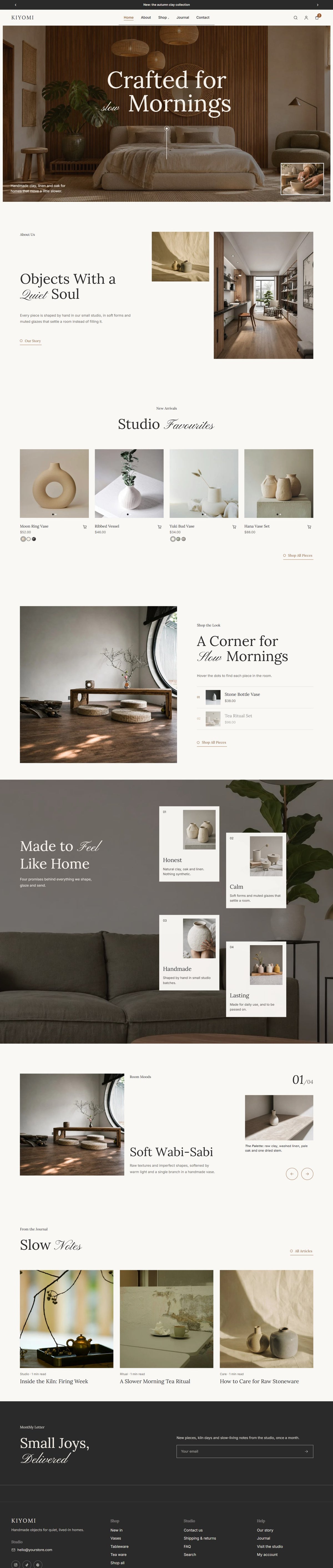
A calm, warm-minimal Shopify theme for home decor, furniture, ceramics and interior shops. Slow scroll animations, room-by-room storytelling and product pages built to sell, so your pieces feel as considered online as they do in the studio. No coding needed.
Highlights
- Full-screen hero with a video pop-up and soft scroll animations on every section
- Room Moods slides that tell the story behind each piece
- Shop the Look: shoppers tap the room to find and buy each item
- Glaze / colour swatches on product and collection pages
- Delivery date estimate and sticky add to bag on product pages
- Slide-out cart with a free-shipping bar and “complete the look” picks
- Mega menu, recently viewed products and a welcome email pop-up
- Visit the Studio page with opening hours and a map, plus a built-in journal (blog)
Pages included
Tap a page to see it in the live demo →
Also included: Shop / Collection, About, Journal, Article, FAQ, Contact, Cart, Search, 404, Password page
Good to know
- Works with every Shopify plan (Shopify plan not included)
- Built from scratch for Online Store 2.0: drag and drop every section in the Shopify editor
- Demo photos included, so your store looks finished from day one
- Instant download, with an illustrated Start Here setup guide
- Want it set up for you? Add Premium Template Installation
Explore what's inside
the Kiyomi Shopify Theme template


The features
- Full-Screen HeroA full-screen room photo with your headline, a scroll line and a video pop-up.
- Scroll AnimationsTitles glide in, photos wipe open and cards drift as visitors scroll. Turn them on or off.
- Room MoodsSlides that tell the story behind your pieces, room by room, with a close-up detail.
- Shop the LookShoppers tap the dots on a room photo to find and buy each piece.
- Glaze SwatchesColour and glaze swatches on product cards and product pages.
- Product Pages That SellDelivery date estimate, sticky add to bag, care guide and tabs.
- Slide-Out CartA free-shipping progress bar and “complete the look” suggestions.
- Visit the StudioOpening hours, address and a map for your studio or shop.
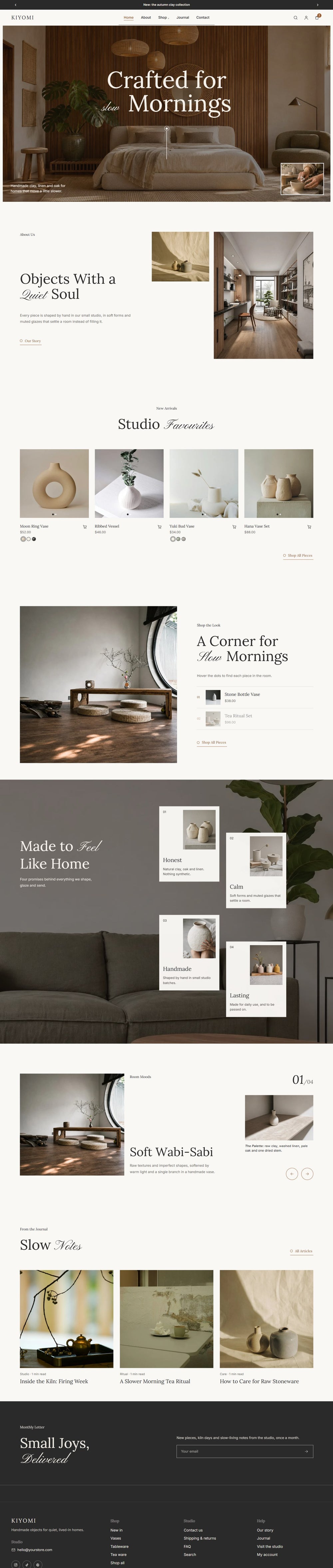
scroll inside to explore ↓
How it works
- one
Purchase
Check out and download your template files and setup guide.
- two
Install
Follow the guide, or add our installation service and we'll do it for you.
- three
Customize
Add your logo, words, photos and colours with drag and drop.
- four
Launch
Press publish and share your beautiful new website!
Do I need to know how to code to use the Kiyomi?
No. Everything in the Kiyomi is edited visually: you click on text, photos or colours to change them. No code, ever.
What do I need to install the Kiyomi?
For a WordPress template: a domain, hosting and WordPress.org with the free Elementor plugin (no Elementor Pro needed). For a Shopify theme: a Shopify store on any plan.
What happens after I buy the Kiyomi?
Your files and an illustrated Start Here guide arrive by email straight after checkout, so you can install the Kiyomi and start customizing the same day.
Can I use the Kiyomi if I already have a website?
That's fine. On WordPress, choose Existing website in the setup: the new pages are added as drafts and nothing changes until you switch the design on. You can restore your previous design in one click. On Shopify, the theme is added as a draft and your current theme stays live until you press publish. Your products, pages and blog posts stay where they are.
Can I change the colours and fonts in the Kiyomi?
Yes. The colours, fonts, photos, text and sections in the Kiyomi can all be changed to match your brand, with no code.
Can Honey Bloom install the Kiyomi for me?
Yes! Add our installation service, or choose full customization and we'll add your content too.
Can I use the demo photos and doodles in the Kiyomi?
The demo photos are placeholders for the preview, so swap them for your own photos or images you have the rights to use.
The hand-drawn doodles, illustrations and fonts that come with the Kiyomi are yours to keep: they're licensed for use on your website.
You might also love




Studio mail · Free
Club Bloom
Your free website launch checklist, then one letter a month from the studio: new templates, behind the scenes and a few good ideas.
One letter a month. Unsubscribe anytime.